Page 11 of 20
MIDI and notes
What MIDI is, how notes travel between blocks, and three ways to write them.
MIDI is a way of writing music down as instructions: which note, when it starts, how long it lasts and how hard it is played. It contains no sound. An instrument block reads the notes and makes the sound, which is why you can swap a piano for a bass or a synth without writing the music again.
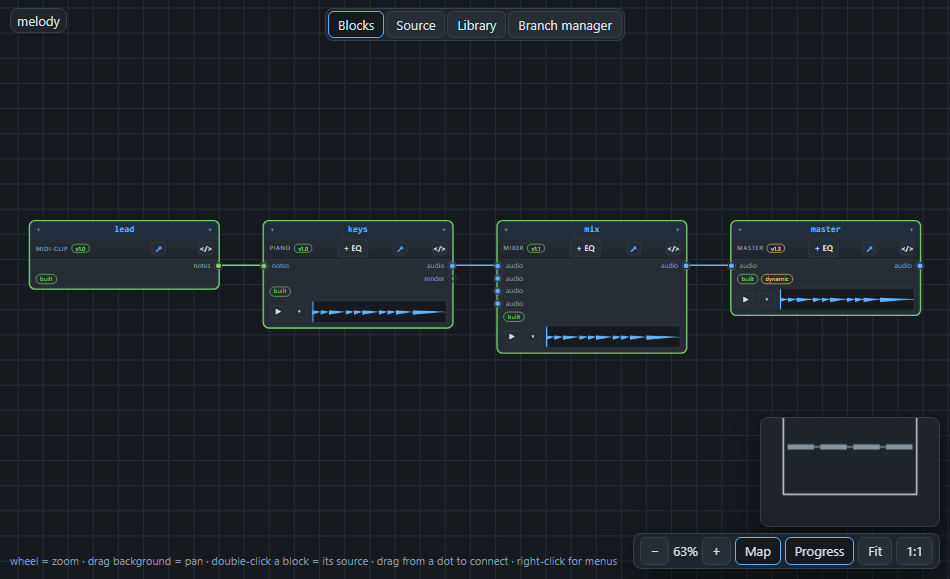
In AMPLE the notes travel through ports of the type notes, the green cables. The midi-clip block makes notes; piano, bass, synth and the General MIDI instrument read them.
Three ways to write notes#
A midi-clip can be written in the way that suits the music:
chords Am F C G              # one chord per bar
melody "a3:0.5 c4:0.5 e4:1"  # note name, then its length in beats
notes "1:0:1:57:96 1:1:1:60:96" # bar:beat:length:pitch:velocity- chords is the quickest: four chords make four bars.
- melody is for a tune: a note name (
a3is an A in the third octave,c4is middle C), a colon and how many beats it lasts. - notes is exact: the bar, the beat inside the bar (starting at 0), the length in beats, the pitch as a number and the velocity (how hard). Pitch 60 is middle C; every semitone up is one more. Velocity goes up to 127.
You rarely type the third form: the piano roll (next page) writes it for you.
A MIDI file#
A MIDI file from another program (.mid) can come into the project too. Drop it on the canvas: the midi block reads it. You choose all tracks or just one, and the block gives you its notes and the sound of a simple rendering. Convert to song… turns a file into editable blocks, with a GM instrument for each channel.
Making the sound#
The instruments that play notes come in kinds:
| Block | Plays notes with |
|---|---|
| Piano, Bass, Synth | a built-in sound or a sample set you choose |
| Guitar (samples) | recorded guitar notes, strummed over chords |
| General MIDI (the instrument block) | a sound font: a file with sounds for 128 standard instruments, chosen by their program number |
Next: drawing notes with the mouse, in The piano roll.