Page 8 of 20
Fades
Fade a sound in or out, or blend one sound into another, counted in bars or in seconds.
A fade changes the volume over time: starting quiet and growing (a fade in), or growing quiet until it stops (a fade out). A crossfade does both at once: one sound fades out while another fades in, so the song moves from one groove to the next without a gap.
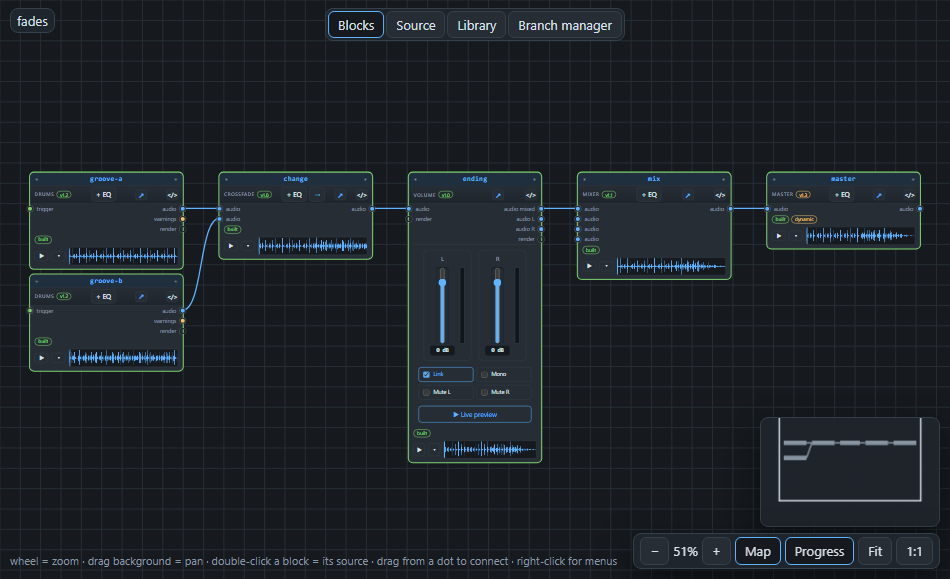
Three ways to fade#
| Way | Use it when |
|---|---|
A fade written in a block's gain | you want to fade something that already has a volume setting |
| A fade block | you want a fade of its own, which you can place anywhere in a chain |
| A crossfade block | two sounds should change into each other |
The first way is the most direct. In the text, gain fadeout(7, 6s, exp) means: start fading out at bar 7, take 6 seconds, and curve it the slow-start way (exp). A fade out ends in complete silence.
Bars or seconds, you choose#
Every fade has a start and a length, and each can be in bars or in seconds. Bars count from the start of the song: 5 is where bar 5 begins and 5.5 is half way through it. A number followed by s, such as 6s, is seconds from the start. Use bars when the fade should follow the music (it changes with the tempo), and seconds when it must last exactly that long.
The fade editor#
You do not have to type it. Select a volume block and press Automate gain: the fade editor opens.
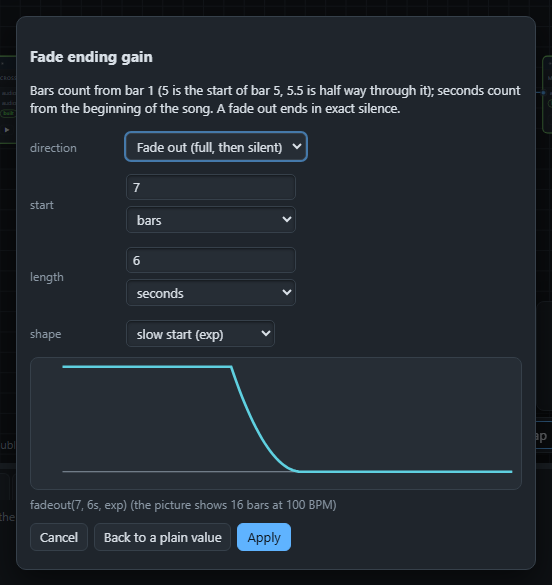
Choose Fade out or Fade in, the start, the length and the shape, and the picture shows the curve. Back to a plain value removes the fade again.
The shape of a fade#
- lin: the volume goes down in a straight line.
- equal: keeps the loudness feeling steady while two sounds cross, so the middle of a crossfade does not sound softer. This is the one to use for crossfades.
- exp: starts slowly and ends quickly, which sounds natural for a fade out.
A crossfade in the text#
crossfade change stable@1.0 {
  from groove-a.audio -> a
  from groove-b.audio -> b
  start 5
  length 1
  shape equal
}
The song plays groove-a, and from bar 5 for one bar it blends into groove-b.
Next: a different way of making music, in The sequencer.