Page 2 of 20
Your first song
Look at a small song, build it and listen to it.
Here is a small song to look at. It has a chord part, drums and a bass, joined by a mixer and a master. You can open the same song in your own AMPLE to follow along.
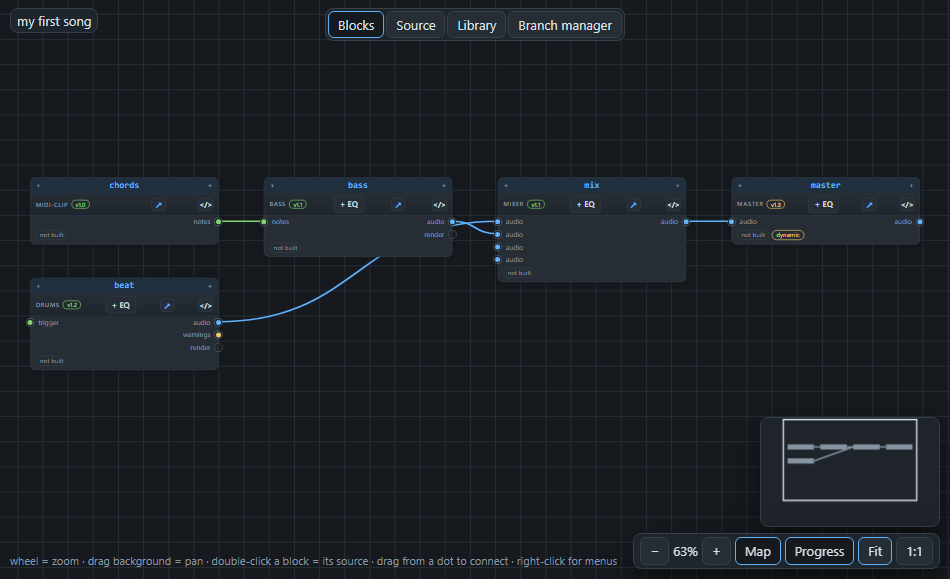
Follow the cables from left to right:
- chords makes the notes of four chords: Am, F, C and G.
- beat plays drums.
- bass reads the chords and plays a bass line that follows them. The green cable from the chords into the bass carries notes.
- mix adds the drums and the bass together.
- master is the end of the line: what comes out of it is the song.
What is in the text#
The same song, as text, looks like this:
project "my first song" { tempo 100  master-seed 7 }

midi-clip chords stable@1.0 {
  chords Am F C G
  bars 8
}
drums beat stable@1.2 at 1 for 8 {
}
bass bass stable@1.1 at 1 for 8 {
  from chords.notes -> notes
}
mixer mix stable@1.1 {
  from beat.audio -> in1
  from bass.audio -> in2
}
master master live@1.3 {
  from mix.mix -> mix
}
Each paragraph is a block: first the kind of block (bass), then its name (bass), then a version tag. The lines inside the curly braces are its settings. A line that starts with from is a cable; it says where the sound or the notes come from.
Build it#
Press Build in the header. AMPLE makes the sound of every block, from the start of the line to the end. When it is done, every block shows a small waveform, and the word "built".
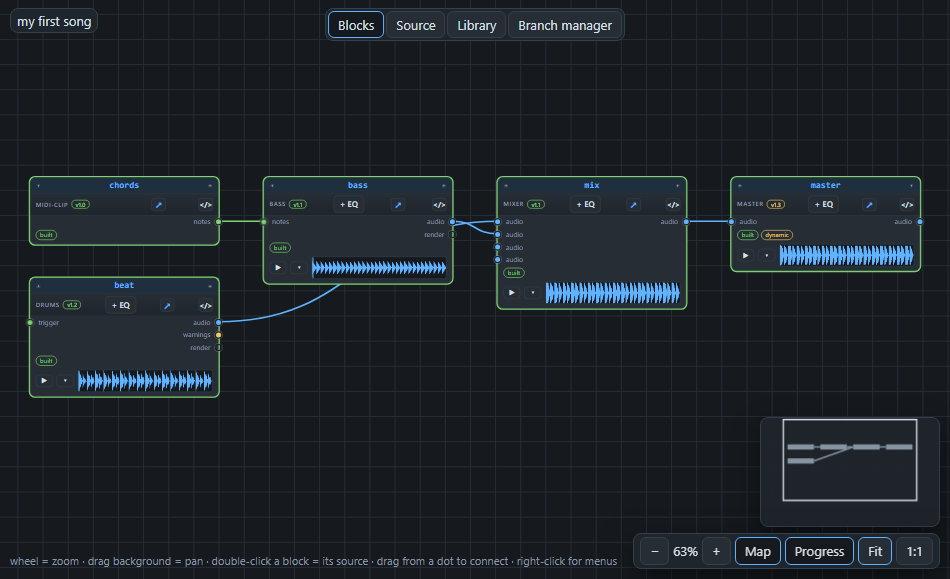
What you see is the take of each block: the audio that block made. It is stored in your project. Press Build again without changing anything, and AMPLE does not make anything again; it finds the takes it already has. That is called a cache hit, and it is why building is fast once a song is built.
Listen#
Press Play. The master block plays from the start. You can also press the small ▶ on any block to hear that block alone, which is a great way to find out what each part contributes.
Next: how the song is counted, in Bars and time.